> ## Documentation Index
> Fetch the complete documentation index at: https://rain-sandbox-trial.mintlify.site/llms.txt
> Use this file to discover all available pages before exploring further.
# Rain-Managed
> Integrate Rain-Managed travel redemptions, from the redemption flow to the code recipes.
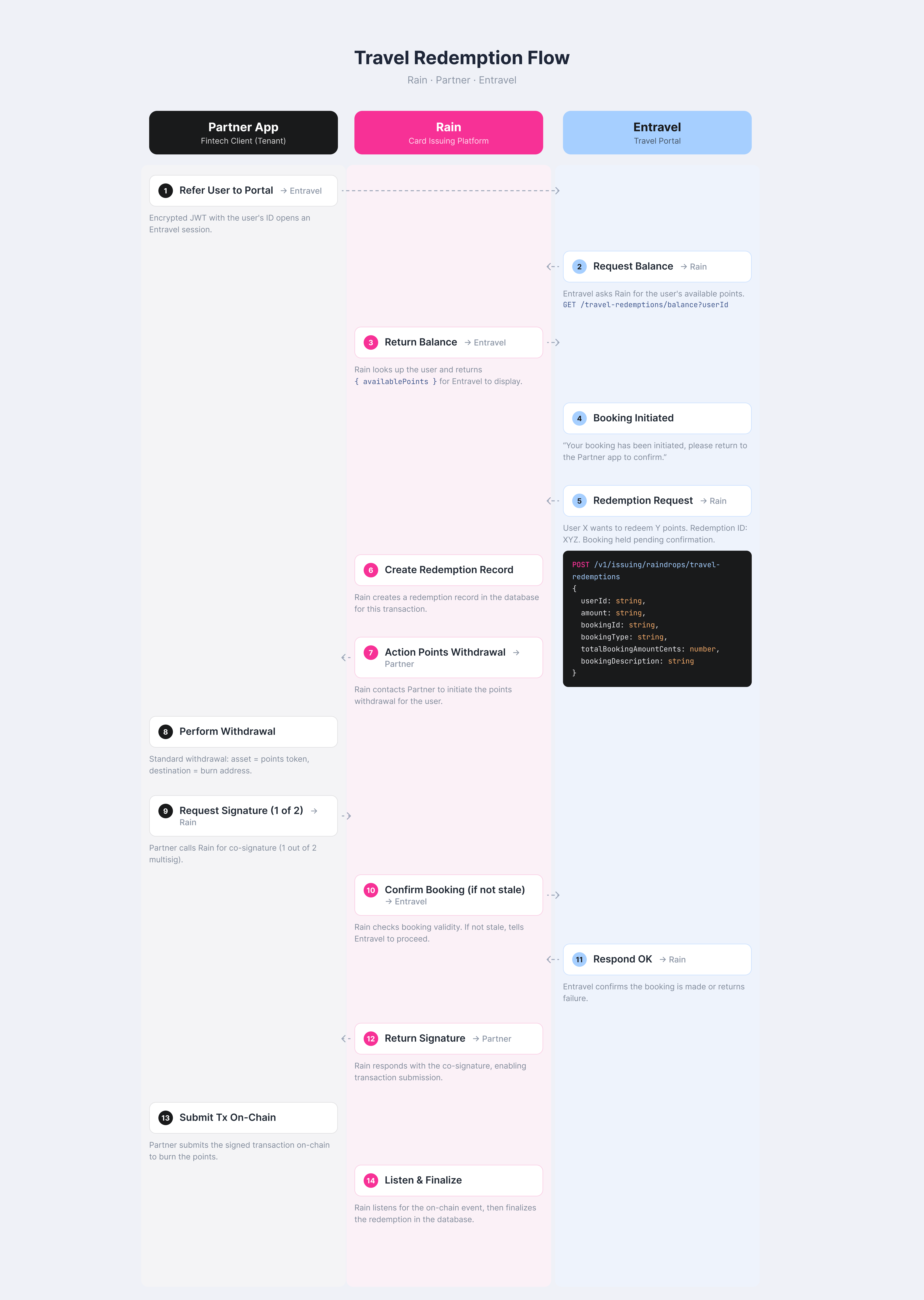
For Rain-Managed programs, Rain orchestrates the redemption lifecycle and fires `raindrop_redemption.created` so you can burn the cardholder's points. This page walks through the end-to-end flow and the two pieces you build: launching the travel portal with a session token, and handling the redemption webhook that triggers the burn. For shared reference such as status values, API endpoints, and billing, see [Travel Redemptions](/docs/rewards/redemptions/travel-redemptions).
 ## Launch the travel portal
When you open the travel portal in a webview, pass an encrypted session token (a JWE) as a query parameter. The portal decrypts the token to identify the cardholder and fetch their travel balance directly from Rain. Encrypt the token with the shared secret Rain provides; do not generate your own. Keep the token short-lived, since the `user_id` claim is all the portal needs to read the balance.
The token payload carries the cardholder's Rain `user_id`, their `email`, and an `exp` expiry:
```ts title="generatePortalSessionToken.ts" theme={null}
import { CompactEncrypt } from "jose";
import crypto from "crypto";
// Shared secret provided by Rain — must match what the portal uses to decrypt.
const RAIN_JWT_SECRET = process.env.RAIN_JWT_SECRET!;
// Base URL for the travel portal (differs per environment).
const TRAVEL_PORTAL_URL = process.env.TRAVEL_PORTAL_URL!;
// Derive a 256-bit key from the secret (required for A256KW).
const encryptionKey = crypto.createHash("sha256").update(RAIN_JWT_SECRET).digest();
/**
* Generate an encrypted session token (JWE) for the travel portal webview.
* @param userId - The cardholder's Rain user ID
* @param email - The cardholder's email address
* @returns Encrypted JWE token string
*/
async function generatePortalSessionToken(userId: string, email: string): Promise {
const claims = JSON.stringify({
user_id: userId,
email,
exp: Math.floor(Date.now() / 1000) + 3600, // 1 hour
});
return new CompactEncrypt(new TextEncoder().encode(claims))
.setProtectedHeader({ alg: "A256KW", enc: "A256CBC-HS512", typ: "JWT" })
.encrypt(encryptionKey);
}
// When launching the webview, append the token as a query parameter:
const token = await generatePortalSessionToken(user.userId, user.email);
const portalUrl = `${TRAVEL_PORTAL_URL}?token=${encodeURIComponent(token)}`;
// Open portalUrl in the in-process webview.
```
Rain provides the shared `RAIN_JWT_SECRET` for encryption—do not generate your own. Never hardcode the secret; read it from your environment.
## Process the redemption webhook
For Rain-Managed programs, you burn the points after a booking. Subscribe to `raindrop_redemption.created` to be notified when a redemption is requested. When the cardholder books travel, Rain reserves the points and sends this webhook to your endpoint so you can prompt the user to sign the withdrawal that burns the points. Verify the signature, acknowledge the webhook immediately so Rain does not time out, then run your existing withdrawal flow out of band to burn the points to the dead address. The `amount` field is the TenantToken quantity in native 18-decimal (wei) units, ready to pass straight into a withdrawal.
The webhook payload looks like this:
```json theme={null}
{
"id": "a1b2c3d4-e5f6-7890-abcd-ef1234567890",
"resource": "raindrop_redemption",
"action": "created",
"body": {
"id": "redemption_abc123",
"userId": "user_def456",
"amount": "1000000000000000000000"
}
}
```
Some tenants also receive a `version` field on the payload, depending on your tenant configuration. Treat it as optional: don't require it, and make sure your handler ignores any fields it doesn't recognize rather than failing on them.
Rain signs every webhook with an HMAC SHA256 signature in the `Signature` header, computed over the exact JSON body using your API key as the secret. Verify it before processing the payload (see [How Webhooks Work](/docs/webhooks)).
```ts title="redemptionWebhookListener.ts" theme={null}
import express from "express";
import { createHmac } from "crypto";
const API_KEY = process.env.RAIN_API_KEY!;
const PORT = Number(process.env.PORT ?? 3000);
// Submit the burn to the dead address — not the zero address. The TenantToken
// contract rewrites the recipient to the zero address when it emits the event.
const DEAD_ADDRESS = "0x000000000000000000000000000000000000dEaD";
function verifyWebhookSignature(rawBody: string, signature: string, apiKey: string): boolean {
const expected = createHmac("sha256", apiKey).update(rawBody).digest("hex");
return expected === signature;
}
async function processRedemption(userId: string, amount: string): Promise {
// Run your existing withdrawal flow to burn `amount` (in wei) of the
// TenantToken to DEAD_ADDRESS: request Rain's withdrawal signature, then
// broadcast the burn onchain. See /docs/withdraw-collateral.
// Retry on failure — the booking is already confirmed, so the points must
// be burned to avoid drift.
}
const app = express();
app.use(express.json({ verify: (req: any, _res, buf) => { req.rawBody = buf.toString(); } }));
app.post("/webhooks", async (req: any, res) => {
// Step 1: verify the signature against the raw body.
const signature = req.headers["signature"] as string;
if (!signature || !verifyWebhookSignature(req.rawBody, signature, API_KEY)) {
return res.status(401).json({ error: "Invalid signature" });
}
// Step 2: handle only raindrop_redemption.created events.
const { resource, action, body } = req.body;
if (resource !== "raindrop_redemption" || action !== "created") {
return res.status(200).json({ ok: true });
}
// Step 3: acknowledge immediately so Rain does not time out.
res.status(200).json({ ok: true });
// Step 4: burn the points out of band.
try {
await processRedemption(body.userId, body.amount);
console.log(`Redemption burn submitted for ${body.id}`);
} catch (err) {
console.error(`Failed to process redemption ${body.id}:`, err);
}
});
app.listen(PORT, () => console.log(`Webhook listener running on port ${PORT}`));
```
## Refunds
After the travel portal receives notice from the supplier (for example, a hotel or airline) that a booking was canceled and must be refunded, it sends Rain a message. Rain then re-issues the burned points to the cardholder and marks the redemption `REFUNDED`. For Rain-Managed programs, Rain re-issues the points and re-mints them onchain on the next liquidation cycle.
## Launch the travel portal
When you open the travel portal in a webview, pass an encrypted session token (a JWE) as a query parameter. The portal decrypts the token to identify the cardholder and fetch their travel balance directly from Rain. Encrypt the token with the shared secret Rain provides; do not generate your own. Keep the token short-lived, since the `user_id` claim is all the portal needs to read the balance.
The token payload carries the cardholder's Rain `user_id`, their `email`, and an `exp` expiry:
```ts title="generatePortalSessionToken.ts" theme={null}
import { CompactEncrypt } from "jose";
import crypto from "crypto";
// Shared secret provided by Rain — must match what the portal uses to decrypt.
const RAIN_JWT_SECRET = process.env.RAIN_JWT_SECRET!;
// Base URL for the travel portal (differs per environment).
const TRAVEL_PORTAL_URL = process.env.TRAVEL_PORTAL_URL!;
// Derive a 256-bit key from the secret (required for A256KW).
const encryptionKey = crypto.createHash("sha256").update(RAIN_JWT_SECRET).digest();
/**
* Generate an encrypted session token (JWE) for the travel portal webview.
* @param userId - The cardholder's Rain user ID
* @param email - The cardholder's email address
* @returns Encrypted JWE token string
*/
async function generatePortalSessionToken(userId: string, email: string): Promise {
const claims = JSON.stringify({
user_id: userId,
email,
exp: Math.floor(Date.now() / 1000) + 3600, // 1 hour
});
return new CompactEncrypt(new TextEncoder().encode(claims))
.setProtectedHeader({ alg: "A256KW", enc: "A256CBC-HS512", typ: "JWT" })
.encrypt(encryptionKey);
}
// When launching the webview, append the token as a query parameter:
const token = await generatePortalSessionToken(user.userId, user.email);
const portalUrl = `${TRAVEL_PORTAL_URL}?token=${encodeURIComponent(token)}`;
// Open portalUrl in the in-process webview.
```
Rain provides the shared `RAIN_JWT_SECRET` for encryption—do not generate your own. Never hardcode the secret; read it from your environment.
## Process the redemption webhook
For Rain-Managed programs, you burn the points after a booking. Subscribe to `raindrop_redemption.created` to be notified when a redemption is requested. When the cardholder books travel, Rain reserves the points and sends this webhook to your endpoint so you can prompt the user to sign the withdrawal that burns the points. Verify the signature, acknowledge the webhook immediately so Rain does not time out, then run your existing withdrawal flow out of band to burn the points to the dead address. The `amount` field is the TenantToken quantity in native 18-decimal (wei) units, ready to pass straight into a withdrawal.
The webhook payload looks like this:
```json theme={null}
{
"id": "a1b2c3d4-e5f6-7890-abcd-ef1234567890",
"resource": "raindrop_redemption",
"action": "created",
"body": {
"id": "redemption_abc123",
"userId": "user_def456",
"amount": "1000000000000000000000"
}
}
```
Some tenants also receive a `version` field on the payload, depending on your tenant configuration. Treat it as optional: don't require it, and make sure your handler ignores any fields it doesn't recognize rather than failing on them.
Rain signs every webhook with an HMAC SHA256 signature in the `Signature` header, computed over the exact JSON body using your API key as the secret. Verify it before processing the payload (see [How Webhooks Work](/docs/webhooks)).
```ts title="redemptionWebhookListener.ts" theme={null}
import express from "express";
import { createHmac } from "crypto";
const API_KEY = process.env.RAIN_API_KEY!;
const PORT = Number(process.env.PORT ?? 3000);
// Submit the burn to the dead address — not the zero address. The TenantToken
// contract rewrites the recipient to the zero address when it emits the event.
const DEAD_ADDRESS = "0x000000000000000000000000000000000000dEaD";
function verifyWebhookSignature(rawBody: string, signature: string, apiKey: string): boolean {
const expected = createHmac("sha256", apiKey).update(rawBody).digest("hex");
return expected === signature;
}
async function processRedemption(userId: string, amount: string): Promise {
// Run your existing withdrawal flow to burn `amount` (in wei) of the
// TenantToken to DEAD_ADDRESS: request Rain's withdrawal signature, then
// broadcast the burn onchain. See /docs/withdraw-collateral.
// Retry on failure — the booking is already confirmed, so the points must
// be burned to avoid drift.
}
const app = express();
app.use(express.json({ verify: (req: any, _res, buf) => { req.rawBody = buf.toString(); } }));
app.post("/webhooks", async (req: any, res) => {
// Step 1: verify the signature against the raw body.
const signature = req.headers["signature"] as string;
if (!signature || !verifyWebhookSignature(req.rawBody, signature, API_KEY)) {
return res.status(401).json({ error: "Invalid signature" });
}
// Step 2: handle only raindrop_redemption.created events.
const { resource, action, body } = req.body;
if (resource !== "raindrop_redemption" || action !== "created") {
return res.status(200).json({ ok: true });
}
// Step 3: acknowledge immediately so Rain does not time out.
res.status(200).json({ ok: true });
// Step 4: burn the points out of band.
try {
await processRedemption(body.userId, body.amount);
console.log(`Redemption burn submitted for ${body.id}`);
} catch (err) {
console.error(`Failed to process redemption ${body.id}:`, err);
}
});
app.listen(PORT, () => console.log(`Webhook listener running on port ${PORT}`));
```
## Refunds
After the travel portal receives notice from the supplier (for example, a hotel or airline) that a booking was canceled and must be refunded, it sends Rain a message. Rain then re-issues the burned points to the cardholder and marks the redemption `REFUNDED`. For Rain-Managed programs, Rain re-issues the points and re-mints them onchain on the next liquidation cycle.