> ## Documentation Index
> Fetch the complete documentation index at: https://rain-sandbox-trial.mintlify.site/llms.txt
> Use this file to discover all available pages before exploring further.

# Set Up Push Provisioning

> Enable users to add their Rain card to Apple Wallet or Google Wallet directly from your app with push provisioning.

Push provisioning enables users to add their Rain card to **Apple Wallet (iOS)** or **Google Wallet (Android)** directly from your app with a single tap, eliminating the need for manual card entry.

Rain enables push provisioning through **MeaWallet**, a third-party SDK that integrates with the Apple Pay and Google Pay provisioning APIs.

<div style={{display: "flex", gap: "16px", alignItems: "center"}}>
  <img src="https://mintcdn.com/rain-sandbox-trial/m2BHTd0fr_FUhXAv/images/applewallet.png?fit=max&auto=format&n=m2BHTd0fr_FUhXAv&q=85&s=ebd4f5874affb2f0e8b55388b107ad57" alt="Add to Apple Wallet" style={{height: "60px"}} width="1280" height="396" data-path="images/applewallet.png" />

  <img src="https://mintcdn.com/rain-sandbox-trial/m2BHTd0fr_FUhXAv/images/googlewallet.png?fit=max&auto=format&n=m2BHTd0fr_FUhXAv&q=85&s=f312ffd0a1e42a2cdbbbd73ef0378431" alt="Add to Google Wallet" style={{height: "60px"}} width="500" height="139" data-path="images/googlewallet.png" />
</div>

## Before you start

<Warning>
  Push provisioning integrations have a few important constraints to plan around:

  * Push provisioning **must be tested using production cards**. Visa does not provide sandbox credit cards.
  * **The MeaWallet configuration files may take up to 10 business days to generate** after your onboarding information is submitted.
  * Provisioning will not work until **Rain activates your production environment** after validation is approved. Activation takes 3 business days. Rain will activate your config as soon as possible so development work can proceed in the meantime.
</Warning>

## Overview

<table>
  <colgroup>
    <col style={{width: "30%"}} />

    <col style={{width: "70%"}} />
  </colgroup>

  <thead>
    <tr><th style={{textAlign: "left"}}>Component</th><th style={{textAlign: "left"}}>Role</th></tr>
  </thead>

  <tbody>
    <tr><td>Partner App</td><td>Displays the <strong>Add to Wallet</strong> button and integrates the SDK</td></tr>
    <tr><td>MeaWallet SDK</td><td>Handles wallet provisioning logic</td></tr>
    <tr><td>Apple Pay / Google Pay APIs</td><td>Perform tokenization and wallet provisioning</td></tr>
    <tr><td>Rain</td><td>Provides configuration, credentials, and card data</td></tr>
  </tbody>
</table>

Partners integrate **directly with the MeaWallet SDK**. MeaWallet provides the **configuration file and credentials** required for the SDK to function. Rain will share these with you.

### Supported platforms

* **iOS**: Apple Wallet
* **Android**: Google Wallet

Rain currently provides the strongest support for **Apple Wallet integrations**.

```mermaid theme={null}
flowchart LR

A[User] --> B[Partner Mobile App]

B --> C[MeaWallet SDK]

C --> D[Apple Pay APIs]
C --> E[Google Pay APIs]

B --> F[Rain API]

F --> C

D --> G[Apple Wallet]
E --> H[Google Wallet]

style B fill:#eef6ff
style C fill:#e8f5e9
style F fill:#fff3e0
```

***

## Integration checklist

### Apple Pay

<Steps>
  <Step title="Sign the Apple Pay Program Manager Agreement">
    You must sign the **Apple Pay Program Manager Agreement** before starting development. This agreement grants your application access to Apple's provisioning APIs.

    Rain will share this agreement with you.
  </Step>

  <Step title="Receive configuration file and credentials">
    MeaWallet will generate:

    * SDK configuration file
    * Repository credentials

    Rain will deliver these to you.
  </Step>

  <Step title="Provide Apple app information">
    Rain will request provisioning entitlements from Apple **on your behalf**. Do not contact Apple directly.

    Provide the following to Rain:

    <table>
      <colgroup>
        <col style={{width: "50%"}} />

        <col style={{width: "50%"}} />
      </colgroup>

      <thead>
        <tr><th>Field</th><th>Notes</th></tr>
      </thead>

      <tbody>
        <tr><td>Team Name</td><td /></tr>
        <tr><td>Team ID</td><td>Production</td></tr>
        <tr><td>Adam ID</td><td>Production</td></tr>
        <tr><td>Apple ID</td><td /></tr>
        <tr><td>Bundle ID</td><td>Production</td></tr>
        <tr><td>Country of business headquarters</td><td /></tr>
        <tr><td>App framework</td><td>React Native or Native</td></tr>
      </tbody>
    </table>

    This information is required for **Apple whitelisting**, which authorizes your app to add cards to Apple Wallet. For more information on finding these ids you can go to these [docs](https://developer.meawallet.com/mpp/ios/installation#entitlement-configuration). The Adam ID and Apple ID tend to be the same.
  </Step>

  <Step title="Production activation">
    1. Rain will notify MeaWallet to activate your config to production.
    2. MeaWallet activates your **production provisioning environment**.
    3. MeaWallet promotes your configuration to production.
  </Step>

  <Step title="Install the MeaWallet SDK">
    Push provisioning is implemented using the **MeaWallet SDK**. Rain does not provide a separate push provisioning API. Use the SDK that matches your app's framework.

    **Native iOS** (Swift / Objective-C)

    * [Installation guide](https://developer.meawallet.com/mpp/ios/installation)
    * [Implementation guide](https://developer.meawallet.com/mpp/ios/implementation-guide)

    **React Native** (cross-platform JavaScript)

    * [Installation guide](https://developer.meawallet.com/mpp/react-native/installation)
    * [Implementation guide](https://developer.meawallet.com/mpp/react-native/implementation-guide)
  </Step>

  <Step title="Implement push provisioning and Wallet Extensions">
    Wallet Extensions allow users to add cards directly from system wallet flows. Follow the [MeaWallet iOS implementation guide](https://developer.meawallet.com/mpp/ios/installation) for both push provisioning and Wallet Extensions setup.

    When initializing `MppCardDataParameters`, use `cardId` and `cardSecret` from Rain, not encrypted card data. See [Apple Pay implementation notes](#apple-pay-impl) for details.
  </Step>

  <Step title="Enable Card Continuity">
    Rain handles this step on your behalf. Card Continuity ensures wallet tokens remain valid when card details change, such as expiration updates or card reissuance for lost or stolen cards. This is supported through Visa's lifecycle management processes, allowing cards stored in digital wallets to be updated automatically without requiring users to re-add the card.
  </Step>

  <Step title="Implement Apple Pay marketing requirements">
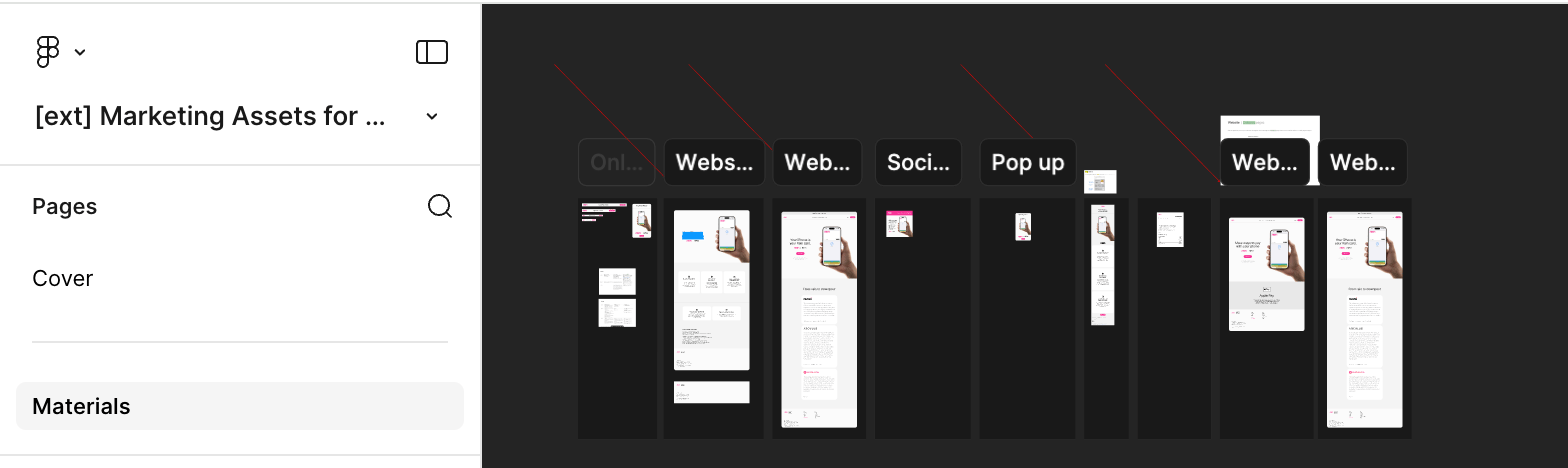
    You must display Apple Pay branding according to Apple guidelines. Rain provides a **pre-approved Figma template** that satisfies Apple's marketing requirements. You must use at least one template asset, customized with your branding.

    Note: Assets will be found in the **materials** tab on the left!

    <img src="https://mintcdn.com/rain-sandbox-trial/m2BHTd0fr_FUhXAv/images/apple-pay-marketing-assets.png?fit=max&auto=format&n=m2BHTd0fr_FUhXAv&q=85&s=c3084bd3b2d91f1e08efde5a1529f3be" alt="Apple Pay marketing assets Figma template" width="1568" height="468" data-path="images/apple-pay-marketing-assets.png" />

    [View template →](https://www.figma.com/design/5rbq5jU9IcQH4PWTWKpBVc/-ext--Marketing-Assets-for-Apple?m=auto\&t=nVDeweZKFP5Ht7Kb-6)
  </Step>

  <Step title="Submit validation video">
    Send Rain a **video demonstrating**:

    * Push provisioning flow
    * Wallet Extensions
    * Card Continuity behavior
    * Apple Pay marketing materials
  </Step>

  <Step title="Test in Production">
    Sandbox testing doesn't work because Visa doesn't provide sandbox cards. Test the full provisioning flow using production cards.
  </Step>
</Steps>

***

### Google Pay

<Steps>
  <Step title="Request Google push provisioning API access">
    Rain handles this step on your behalf. Rain submits the allowlist request to Google and may add your app as a sub-entity under Rain's issuer sponsorship.
  </Step>

  <Step title="Receive configuration file and credentials">
    MeaWallet will generate:

    * SDK configuration file
    * Repository credentials

    Rain will deliver these to you.
  </Step>

  <Step title="Review the MeaWallet docs">
    Any agreements you have to sign will be provided in these docs.

    **Native Android** (Kotlin / Java)

    * [Installation guide](https://developer.meawallet.com/mpp/android/installation)

    **React Native** (cross-platform JavaScript)

    * [Installation guide](https://developer.meawallet.com/mpp/react-native/installation)
  </Step>

  <Step title="Production activation">
    1. Rain will notify MeaWallet to activate your config to production.
    2. MeaWallet activates your **production provisioning environment**.
    3. MeaWallet promotes your configuration to production.
  </Step>

  <Step title="Install the MeaWallet SDK">
    Use the SDK that matches your app's framework.

    **Native Android** (Kotlin / Java)

    * [Installation guide](https://developer.meawallet.com/mpp/android/installation)

    **React Native** (cross-platform JavaScript)

    * [Installation guide](https://developer.meawallet.com/mpp/react-native/installation)
  </Step>

  <Step title="Implement push provisioning">
    Follow the MeaWallet Android implementation guide.

    <Warning>
      Use **Legacy push provisioning**, not Unified push provisioning. See the [Google Pay push provisioning docs](https://developers.google.com/pay/issuers/apis/push-provisioning/android).
    </Warning>

    See [Google Pay implementation notes](#google-pay-impl) for details on credential handling and whitelisting.
  </Step>

  <Step title="Test in Production">
    Sandbox testing doesn't work because Visa doesn't provide sandbox cards.
  </Step>
</Steps>

***

## Common integration mistakes

### Using Unified push provisioning for Google Pay

Google Pay integrations must use **Legacy push provisioning**. Unified push provisioning is not currently supported by Rain.

### Running the iOS app directly from Xcode

Push provisioning will fail if the app is run directly from Xcode. The app must be installed via **TestFlight**.

### Testing with sandbox cards

Visa does not support sandbox push provisioning. The full flow must be tested with **production cards**.

***

## Implementation notes

<a id="apple-pay-impl" />

### Apple Pay

When initializing `MppCardDataParameters`, use the method that accepts `cardId` and `cardSecret`, not encrypted card data. This removes the need for partners to implement their own encryption.

Retrieve these values from the Rain API:

```bash theme={null}
GET /v1/issuing/cards/{cardId}/processorDetails
```

```json theme={null}
{
  "processorCardId": "<string>",
  "timeBasedSecret": "<string>"
}
```

See [Get processor details of a card](/reference/cards/get-processor-details-of-a-card).

***

<a id="google-pay-impl" />

### Google Pay

When configuring Google Pay push provisioning, use **Legacy push provisioning**, not Unified push provisioning.

See the [Google Pay push provisioning docs](https://developers.google.com/pay/issuers/apis/push-provisioning/android).

**Credential handling:** Key exchange for secure card credentials is handled by MeaWallet, not the partner backend. Your mobile app should pass `cardId` and `cardSecret` (or the encrypted PAN payload). MeaWallet generates the required provisioning payload internally.

**Whitelisting issues:** Some partners have encountered provisioning errors due to incomplete Google whitelisting. If provisioning fails, confirm your app package name and SHA-256 certificate fingerprint are correctly registered with Google.

***

## Testing

Push provisioning must be tested using **production cards**. Visa does not support sandbox provisioning, so the full flow cannot be validated in a development environment.

### iOS

Push provisioning must be tested through **TestFlight**. Provisioning will not work if the app is run directly from Xcode.

***

## Integration notes

* **No Rain API integration is needed for provisioning itself.** Push provisioning runs through the MeaWallet SDK; Rain provides the configuration file, credentials, and card processor details.
* **Push provisioning is required, but doesn't block go-live.** Production testing can continue while your implementation is in progress.
* **One configuration file covers both wallets.** A single MeaWallet configuration supports Apple Pay and Google Pay; tell MeaWallet which platforms you support so the configuration is promoted to production correctly.
* **Provisioning outcomes surface on the `card.notification` webhook.** Successful tokenizations appear on `card.updated` (`statusChangeReason: wallet_provisioned`), and declined provisioning attempts arrive as [`card.notification`](/docs/card#card-notification) events with `reasonCode: PROVISIONING_DECLINED` and a decision reason. Failures inside the Apple or Google flow that never reach a decision are not exposed.
* **Sandbox testing isn't available.** Visa doesn't provide sandbox cards for provisioning, so the full flow must be tested in production on a small set of cards.
* **Regional availability is Apple's and Google's call.** If Apple Pay isn't supported in the user's region, provisioning fails with an iOS error that Rain can't override.

***

## Provisioning flow

```mermaid theme={null}
sequenceDiagram

participant U as User
participant A as Partner App
participant R as Rain API
participant M as MeaWallet SDK
participant W as Apple/Google Wallet

U->>A: Tap "Add to Wallet"

A->>R: Request card processor details
R-->>A: processorCardId + timeBasedSecret

A->>M: Initialize provisioning with card data

M->>W: Send provisioning request

W->>W: Risk checks & tokenization

W-->>M: Provisioning response

M-->>A: Success / failure

A-->>U: Card added to wallet
```

## Troubleshooting

### Provisioning blocked by Apple/Google risk engine

Wallet providers operate internal risk engines that may block provisioning attempts. Common triggers include:

* Too many wallet add attempts in a short period
* Repeated failed provisioning attempts
* Device flagged by Apple or Google
* Region mismatch between device and card
* Historical wallet fraud signals

**Recommended guidance:** Have users wait **24–48 hours** before retrying. Rain cannot override wallet risk engine decisions.

***

### Region mismatch

All Rain cards are issued from **Puerto Rico**. Wallet providers evaluate several signals when determining provisioning eligibility:

* Device region
* Apple/Google account region
* SIM country
* IP address
* Risk history

Provisioning eligibility is not determined solely by card issuing country.

***

### Production API calls failing

If production API calls fail during development, this is expected. Provisioning will only work after Rain activates the production environment with MeaWallet.

***

### Configuration file delays

MeaWallet may require **several weeks** to generate the configuration file needed for SDK initialization. Rain will send the file once it is available.

***

### MeaWallet API key header error

If provisioning fails with one of the following errors:

**iOS**

```text theme={null}
Error Domain=com.meawallet.mpp.error Code=-1001 "MEA_API_KEY_ID_HEADER_INVALID_VALUE"
```

**Android**

```text theme={null}
Request header API key processing error received from MeaWallet Token Management. Header 'mea-api-key-id' : invalid value
```

Your configuration may not yet be promoted to production. Contact Rain to confirm that MeaWallet has activated your production configuration.